# Haus der Statistik

Dokumentation von Prozessen rund ums Haus der Statistik

# Kommunikation

Welche grafischen Standards sollen bei Publikationen eingehalten werden? Welche Farben sollen benutzt werden? Was geht gar nicht?

# Neue Seite


# Kommunikation und Typo

<span style="font-weight: 400;">Dieser Leitfaden soll dazu dienen, die Kommunikation nach Außen zu vereinheitlichen. Er kann im Laufe der Zeit ergänzt werden.</span>

### Bildsprache

- <span style="font-weight: 400;">Bilder so natürlich wie möglich: keine Filter oder zu starke Photoshop-Bearbeitungen</span>
- <span style="font-weight: 400;">ggf. sowohl Hochformat als auch Querformat aufnehmen, um verschiedenen Medien gerecht werden zu können</span>

<span style="font-weight: 400;"> </span>

### Text

#### <span style="font-weight: 400;">Ansprache der Adressaten</span>

- <span style="font-weight: 400;">nach Medium differenziert</span>
- <span style="font-weight: 400;">facebook, Newsletter: ihr/euch</span>
- <span style="font-weight: 400;">instagram: du/ihr</span>
- <span style="font-weight: 400;">Website: </span><span style="font-weight: 400;">(passiv?)</span>


#### <span style="font-weight: 400;">Stil</span>

- <span style="font-weight: 400;">Broschüren: professionell, gehobene Sprache</span>
- <span style="font-weight: 400;">Website: (?)</span>
- <span style="font-weight: 400;">Facebook: gehobene Alltagssprache, nahbar</span>
- <span style="font-weight: 400;">instagram: humorvoll, mit Augenzwinkern</span>

#### <span style="font-weight: 400;">Detailtypografie</span>

##### <span style="font-weight: 400;">Anführungszeichen</span>

[![image-1625580592538.png](https://doku.zusammenkunft.berlin/uploads/images/gallery/2021-07/scaled-1680-/image-1625580592538.png)](https://doku.zusammenkunft.berlin/uploads/images/gallery/2021-07/image-1625580592538.png)

<span style="font-weight: 400;">Quelle: [https://typefacts.com/artikel/anfuehrungszeichen](https://typefacts.com/artikel/anfuehrungszeichen)   
→ Am besten automatische (im Deutschen falsche) Ersetzung in GoogleDocs deaktivieren:  
*Tools &gt; Einstellungen &gt;* *Typografische Anführungszeichen verwenden* → **Haken rausnehmen**  
</span>

[![image-1625580636101.png](https://doku.zusammenkunft.berlin/uploads/images/gallery/2021-07/scaled-1680-/image-1625580636101.png)](https://doku.zusammenkunft.berlin/uploads/images/gallery/2021-07/image-1625580636101.png)

<span style="font-weight: 400;">→ In Veröffentlichungen "" durch „“ ersetzen:</span><span style="font-weight: 400;">  
</span>

[![image-1625580817855.png](https://doku.zusammenkunft.berlin/uploads/images/gallery/2021-07/scaled-1680-/image-1625580817855.png)](https://doku.zusammenkunft.berlin/uploads/images/gallery/2021-07/image-1625580817855.png)

- ##### Gedankenstriche/Bindestriche

<span style="font-weight: 400;">normaler Binde-/Trennstrich (wie auf Tastatur):</span>

[![image-1625580854507.png](https://doku.zusammenkunft.berlin/uploads/images/gallery/2021-07/scaled-1680-/image-1625580854507.png)](https://doku.zusammenkunft.berlin/uploads/images/gallery/2021-07/image-1625580854507.png)

<span style="font-weight: 400;">Gedankenstrich ist länger („Halbgeviertstrich“) und wird mit Leerzeichen gesetzt:</span>

[![image-1625580870851.png](https://doku.zusammenkunft.berlin/uploads/images/gallery/2021-07/scaled-1680-/image-1625580870851.png)](https://doku.zusammenkunft.berlin/uploads/images/gallery/2021-07/image-1625580870851.png)

[![image-1625580918051.png](https://doku.zusammenkunft.berlin/uploads/images/gallery/2021-07/scaled-1680-/image-1625580918051.png)](https://doku.zusammenkunft.berlin/uploads/images/gallery/2021-07/image-1625580918051.png)

<span style="font-weight: 400;">Quelle und mehr dazu: </span>[<span style="font-weight: 400;">https://typefacts.com/artikel/binde-und-gedankenstrich</span>](https://typefacts.com/artikel/binde-und-gedankenstrich)<span style="font-weight: 400;"> </span>

- ##### Apostroph

- <span style="font-weight: 400;">in der Regel falsch verwendet, daher als Faustregel im Deutschen: </span>*<span style="font-weight: 400;">Weglassen!</span><span style="font-weight: 400;">  
    </span>*<span style="font-weight: 400;">siehe auch </span>[<span style="font-weight: 400;">https://typefacts.com/artikel/apostroph</span>](https://typefacts.com/artikel/apostroph)<span style="font-weight: 400;"> </span>
- <span style="font-weight: 400;">ganz falsch: GmbH`s, Nico´s Imbiss („Deppenapostroph“)</span>
- <span style="font-weight: 400;">richtig: Clemens’ Typo-Guide; so geht’s</span>
- <span style="font-weight: 400;"><span style="font-weight: 400;">EN/FR:</span></span>[![image-1625580967488.png](https://doku.zusammenkunft.berlin/uploads/images/gallery/2021-07/scaled-1680-/image-1625580967488.png)](https://doku.zusammenkunft.berlin/uploads/images/gallery/2021-07/image-1625580967488.png)
    
    [![image-1625580985042.png](https://doku.zusammenkunft.berlin/uploads/images/gallery/2021-07/scaled-1680-/image-1625580985042.png)](https://doku.zusammenkunft.berlin/uploads/images/gallery/2021-07/image-1625580985042.png)


### <span style="font-weight: 400;">Konventionen</span>

- ##### Hervorhebungen im Text
    
    
    - <span style="font-weight: 400;">möglichst dezent, eher Kursivierung anstatt Fettung verwenden</span>


- ##### Schreibweise für Orte

- <span style="font-weight: 400;">WERKSTATT Haus der Statistik</span>
- <span style="font-weight: 400;">Musterhaus der Statistik (Autoscooter)</span>
- <span style="font-weight: 400;">Straßennamen (Personen mit Vor- und Nachnamen) mit Bindestrichen! </span>
- <span style="font-weight: 400;">Otto-Braun-Straße ✔ </span><span style="font-weight: 400;">Otto Braun Strasse </span><span style="font-weight: 400;">×</span>
- <span style="font-weight: 400;">Karl-Marx-Allee</span>


#####  

- ##### gendergerechte Sprache mit Doppelpunkt oder Partizip-Präsens

- <span style="font-weight: 400;">Bewohner:innen, Besucher:innen / Nutzende, Studierende</span>
- <span style="font-weight: 400;">Mitglieder (falsch: </span><span style="font-weight: 400;">Mitglieder:innen</span><span style="font-weight: 400;">!)</span>


- ##### Zeiten und Daten jeweils möglichst einheitlich

- <span style="font-weight: 400;">Kurzform: </span>*<span style="font-weight: 400;">Fr, 1.8. 13–16:30 Uhr </span>*<span style="font-weight: 400;">\[Bis-Zeichen = Gedankenstrich, ohne Leerzeichen!\]</span>
- <span style="font-weight: 400;">Langform im Text: </span>*<span style="font-weight: 400;">Freitag, den 1. August, von 13:00 bis 16:30 Uhr</span>*


- - <span style="font-weight: 400;">so nicht: </span>*<span style="font-weight: 400;">13h 13:00-16 h</span><span style="font-weight: 400;"> </span>*

- ##### „Distanzierung“ von fremden Texten (z. B. Veranstaltenden)

- <span style="font-weight: 400;">mit Hinweis: </span>*<span style="font-weight: 400;">Beschreibung der Veranstaltenden</span>*
- <span style="font-weight: 400;">Klarheit, wer kommuniziert, z. B. „Wir freuen uns über Hilfe beim Subbotnik“ = HdM spricht, nicht Initiative Haus der Statistik</span>


- ##### Newsletter: Kursivierung von Eigennamen

- *<span style="font-weight: 400;">ZK/U, raumlabor, SunSeeker e. V.</span>*<span style="font-weight: 400;"> …</span>


- ##### Föderungs-Credits klein

- <span style="font-weight: 400;">Website: mit `<small>Gefördert durch ABC</small>` ummantelt</span>
- <span style="font-weight: 400;">Bsp: „Die Veranstaltung wird durch Kulturfördermittel der Senatsverwaltung für Kultur und Europa kofinanziert.“</span>

# Styleguide Koop5 CI

Für die einheitliche Kommunikation über das Projekt Haus der Statistik wurde von der Koop5 eine Corporate Identity in Auftrag gegeben. Diese ist in jeglicher Kommunikation des Projekts anzuwenden.   
  
Diese Seite als PDF-Präsentation: [HDS\_styleguide\_190710\_MT.pdf](https://drive.google.com/file/d/1dsCy0tO60qNI_MN6Y-8IzmpsYhdXimcI/view?usp=sharing)

Ordner mit allen Logos, Farben, Corporate Identity: [https://drive.google.com/open?id=1VSRnhl938tW\_uc6yADWfu\_-ZBSvqlHr3](https://drive.google.com/open?id=1VSRnhl938tW_uc6yADWfu_-ZBSvqlHr3)

### Logotype

[![image-1603110561651.png](https://doku.zusammenkunft.berlin/uploads/images/gallery/2020-10/scaled-1680-/image-1603110561651.png)](https://doku.zusammenkunft.berlin/uploads/images/gallery/2020-10/image-1603110561651.png)

[![image-1603110638147.png](https://doku.zusammenkunft.berlin/uploads/images/gallery/2020-10/scaled-1680-/image-1603110638147.png)](https://doku.zusammenkunft.berlin/uploads/images/gallery/2020-10/image-1603110638147.png)

[![image-1603110663405.png](https://doku.zusammenkunft.berlin/uploads/images/gallery/2020-10/scaled-1680-/image-1603110663405.png)](https://doku.zusammenkunft.berlin/uploads/images/gallery/2020-10/image-1603110663405.png)

#### Minimaler Sicherheitsabstand

Logotype „Haus der Statistik“ und „Modellprojekt Haus der Statistik“  
<span style="color: #ff0000;">Abstand rundum: 1/5 der Logobreite</span>

[![image-1603110751426.png](https://doku.zusammenkunft.berlin/uploads/images/gallery/2020-10/scaled-1680-/image-1603110751426.png)](https://doku.zusammenkunft.berlin/uploads/images/gallery/2020-10/image-1603110751426.png)

[![image-1603110781572.png](https://doku.zusammenkunft.berlin/uploads/images/gallery/2020-10/scaled-1680-/image-1603110781572.png)](https://doku.zusammenkunft.berlin/uploads/images/gallery/2020-10/image-1603110781572.png)

Logotype „Haus der Statistik“ Solid\_Mini  
<span style="color: #ff0000;">Abstand rundum: 1/2 der Logobreite</span>

[![image-1603110841497.png](https://doku.zusammenkunft.berlin/uploads/images/gallery/2020-10/scaled-1680-/image-1603110841497.png)](https://doku.zusammenkunft.berlin/uploads/images/gallery/2020-10/image-1603110841497.png)

#### Ausgeschlossene Anwendungen

[![image-1603110948991.png](https://doku.zusammenkunft.berlin/uploads/images/gallery/2020-10/scaled-1680-/image-1603110948991.png)](https://doku.zusammenkunft.berlin/uploads/images/gallery/2020-10/image-1603110948991.png)

#### Übersicht Files

[![image-1603110980011.png](https://doku.zusammenkunft.berlin/uploads/images/gallery/2020-10/scaled-1680-/image-1603110980011.png)](https://doku.zusammenkunft.berlin/uploads/images/gallery/2020-10/image-1603110980011.png)

###  

### Schriften

[![image-1603111010620.png](https://doku.zusammenkunft.berlin/uploads/images/gallery/2020-10/scaled-1680-/image-1603111010620.png)](https://doku.zusammenkunft.berlin/uploads/images/gallery/2020-10/image-1603111010620.png)

[![image-1603111043466.png](https://doku.zusammenkunft.berlin/uploads/images/gallery/2020-10/scaled-1680-/image-1603111043466.png)](https://doku.zusammenkunft.berlin/uploads/images/gallery/2020-10/image-1603111043466.png)

#### Die Typografie (Publikationen)

organisiert die Textinformationen in einem klaren und ökonomischen Zweispalten-System in gut lesbaren Schriftgrößen und großen Headlines und lässt verschiedene Artikel ineinandergreifen. Auszeichnungen werden sparsam eingesetzt.

[![image-1603111123380.png](https://doku.zusammenkunft.berlin/uploads/images/gallery/2020-10/scaled-1680-/image-1603111123380.png)](https://doku.zusammenkunft.berlin/uploads/images/gallery/2020-10/image-1603111123380.png)

### Formen

[![image-1603111157318.png](https://doku.zusammenkunft.berlin/uploads/images/gallery/2020-10/scaled-1680-/image-1603111157318.png)](https://doku.zusammenkunft.berlin/uploads/images/gallery/2020-10/image-1603111157318.png)

### Grafiken

[![image-1603111213343.png](https://doku.zusammenkunft.berlin/uploads/images/gallery/2020-10/scaled-1680-/image-1603111213343.png)](https://doku.zusammenkunft.berlin/uploads/images/gallery/2020-10/image-1603111213343.png)

### Bilder

[![image-1603111244015.png](https://doku.zusammenkunft.berlin/uploads/images/gallery/2020-10/scaled-1680-/image-1603111244015.png)](https://doku.zusammenkunft.berlin/uploads/images/gallery/2020-10/image-1603111244015.png)

### Farben

#### CMYK

[![image-1603111278210.png](https://doku.zusammenkunft.berlin/uploads/images/gallery/2020-10/scaled-1680-/image-1603111278210.png)](https://doku.zusammenkunft.berlin/uploads/images/gallery/2020-10/image-1603111278210.png)

[![image-1603111293672.png](https://doku.zusammenkunft.berlin/uploads/images/gallery/2020-10/scaled-1680-/image-1603111293672.png)](https://doku.zusammenkunft.berlin/uploads/images/gallery/2020-10/image-1603111293672.png)

#### RGB

[![image-1603111309768.png](https://doku.zusammenkunft.berlin/uploads/images/gallery/2020-10/scaled-1680-/image-1603111309768.png)](https://doku.zusammenkunft.berlin/uploads/images/gallery/2020-10/image-1603111309768.png)

[![image-1603111360953.png](https://doku.zusammenkunft.berlin/uploads/images/gallery/2020-10/scaled-1680-/image-1603111360953.png)](https://doku.zusammenkunft.berlin/uploads/images/gallery/2020-10/image-1603111360953.png)

# zusammenkunft.berlin-Website bearbeiten

<article class="markdown-body" id="bkmrk-login-auf-https%3A%2F%2Fzu">- Login auf [https://zusammenkunft.berlin/wp-admin](https://zusammenkunft.berlin/wp-admin)
- Bearbeitungen bei "Semplice" vornehmen
- [*Semplice overview and quickstart guide*](https://help.semplice.com/hc/en-us/articles/360034485852)

## Mitglieder/Team bearbeiten

- Page "ZUsammenKUNFT Berlin – Genossenschaft ..." bearbeiten

### Neue hinzufügen

- Bild oder Text eines Menschen anklicken, dann im Kontextmenü in den Spalten-Modus umschalten (zweiter Kreis von oben). Im Kontextmenü unten links kann die Spalte dupliziert werden:
    
    [![image-1620817218565.png](https://doku.zusammenkunft.berlin/uploads/images/gallery/2021-05/scaled-1680-/image-1620817218565.png)](https://doku.zusammenkunft.berlin/uploads/images/gallery/2021-05/image-1620817218565.png)
- Namen bearbeiten,
    
    
    - Link anpassen: oben links auf `< >` klicken, um den HTML-Code zu bearbeiten
        
        [![image-1620817287897.png](https://doku.zusammenkunft.berlin/uploads/images/gallery/2021-05/scaled-1680-/image-1620817287897.png)](https://doku.zusammenkunft.berlin/uploads/images/gallery/2021-05/image-1620817287897.png)
    - Anker-ID zwischen den "" anpassen: `<h3 id="vorname-nachname">Vorname Nachname</h3>`
    - (Nun kann mit [https://zusammenkunft.berlin/#vorname-nachname](https://zusammenkunft.berlin/#vorname-nachname) , z. B. in der Projekt-Mitwirkendenaufzählung, verlinkt werden)

### Team → Ehemalige

[![grafik.png](https://doku.zusammenkunft.berlin/uploads/images/gallery/2023-07/scaled-1680-/grafik.png)](https://doku.zusammenkunft.berlin/uploads/images/gallery/2023-07/grafik.png)
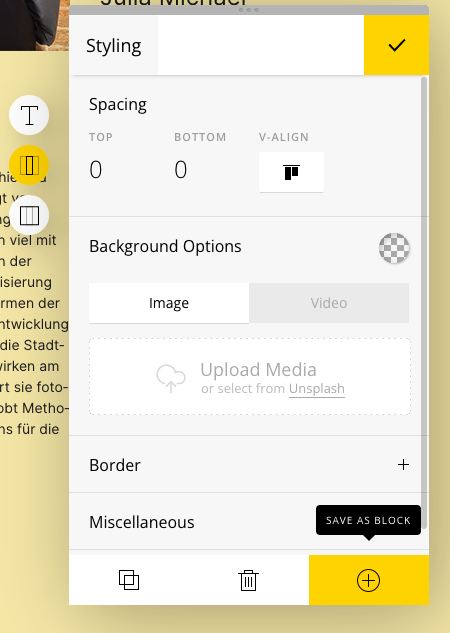
- *Column* &gt; *Save as Block*
- Block auf [Seite "Ehemalige"](https://zusammenkunft.berlin/wp-admin/admin.php?page=semplice-admin#edit/271) wieder einfügen

## Textsatz

- Die Team-Karten sind in schmalen Textspalten gesetzt, das bedeutet, dass lange deutsche Komposita Probleme machen können: hässliche Löcher am Ende der Zeilen, wenn die Worttrennung nicht manuell eingegeben wird.
    
    
    - **Lösung**: unsichtbare [*Bedingte Trennstriche*](https://de.wikipedia.org/wiki/Bedingter_Trennstrich) als Unicode-Zeichen einfügen. Je nach System ist die Eingabe unterschiedlich:
    - <table><tbody><tr><td style="width: 77px;">Windows</td><td style="width: 648.8px;">`Alt` + `0` `1` `7` `3`</td></tr><tr><td style="width: 77px;">Mac</td><td style="width: 648.8px;">Keine definierte Taste. Kann über die Zeichenübersicht eingefügt werden per Suche nach Unicode-Steuerzeichen SOFT HYPHEN.</td></tr><tr><td style="width: 77px;">Linux</td><td style="width: 648.8px;">`Compose (Alt Gr + Shift)`, `-`, `-`, `Leer`</td></tr></tbody></table>
    - alternativ: `&shy;` im HTML-Code zwischen die Sil­ben setzen.
    - Beispiel: gemein(-)wohl(-)orien(-)tierte Stadt(-)ent(-)wick(-)lung bzw. `gemein&shy;wohl­­­­­­&shy;­orien&shy;tierte Stadt&shy;ent&shy;wick&shy;lung`

## Bilder

- im Hochformat, vor neutralem Hintergrund (z. B. Rolladen der Imbiss-Oase!) aufnehmen, Einstellung "amerikanisch"/"halbnah" ![Einstellungen, Kameraeinstellungen, Perspektive](https://i.pinimg.com/originals/b9/72/b4/b972b410bb0b8c06434db65d99cb4a46.jpg)
- auf Ansichtsverhältnis 2:3 zuschneiden, Zuschnitt so wählen, dass Kopfgröße und Augenhöhe ungefähr mit den anderen Bildern übereinstimmt
    
    
    - notfalls unten einen Streifen ansetzen: [![image-1620817436916.png](https://doku.zusammenkunft.berlin/uploads/images/gallery/2021-05/scaled-1680-/image-1620817436916.png)](https://doku.zusammenkunft.berlin/uploads/images/gallery/2021-05/image-1620817436916.png)
- als JPG mit Dateinamen `vorname_nachname.jpg` (oder `vorname_nachname_c_fotografin.jpg` , falls Copyright wichtig) abspeichern. 
    - Bildgröße: 270 × 405 px
    - Datei sollte max. 75 KB groß sein (ggf. JPG-Qualität auf 70–80% verringern)

</article>

# InDesign-Template mit Daten aus Tabelle füttern

Daten aus Exceltabellen können in InDesign importiert werden. Das kann eine Menge an stupider Copy&amp;Paste-Arbeit ersparen.

### Voraussetzungen

- InDesign CS5 oder höher
- LibreOffice Calc (7.0+) 
    - Excel sollte auch funktionieren, analoge Einstellungen selbst finden

### 1 Daten exportieren

aus Googlesheets oder Excel: als xls oder csv abspeichern

### 2 Daten in LibreOffice aufbereiten

- öffnen
- Sicherstellen, dass alle Spalten benannt sind (Beschriftung erste Zeile)
- Zeilenumbrüche in Textfeldern (`\\n`) suchen und durch `¶` ersetzen 
    - [![image-1622459626390.png](https://doku.zusammenkunft.berlin/uploads/images/gallery/2021-05/scaled-1680-/image-1622459626390.png)](https://doku.zusammenkunft.berlin/uploads/images/gallery/2021-05/image-1622459626390.png)
- weitere Rohdatenkorrekturen durchführen 
    - z. B. Sekunden in Zeiten löschen: `:00:00` suchen und durch `:00` ersetzen
- als **Tab-getrennte** CSV-Datei mit Unicode (**UTF-16**)-Kodierung abspeichern als   
    `YYMMDD_Dateiname_Unicode-UTF16_tab_no-line-breaks.csv`

### 3 Daten in InDesign importieren

- Fenster &gt; Hilfsprogramme &gt; Datenzusammenführung öffnen
- Kontextmenü: "Datenquelle auswählen"
- CSV-Datei auswählen
- Vorschau überprüfen
- "Zusammengeführtes Dokument erstellen"

### 4 Korrekturen in InDesign

- in InDesign die Zeilenumbrüche mit Suchen/Ersetzen (`Strg`+`F`) wiederherstellen 
    - <span style="color: #444444; font-family: Inter, -apple-system, BlinkMacSystemFont, 'Segoe UI', Roboto, Oxygen, Ubuntu, Cantarell, 'Helvetica Neue', 'Apple Color Emoji', 'Segoe UI Emoji', 'Segoe UI Symbol', 'Meiryo UI', Arial, sans-serif; font-size: 14px; font-style: normal; font-variant-ligatures: normal; font-variant-caps: normal; font-weight: 400; letter-spacing: normal; text-align: left; text-indent: 0px; text-transform: none; white-space: normal; word-spacing: 0px; -webkit-text-stroke-width: 0px; text-decoration-style: initial; text-decoration-color: initial; display: inline !important; float: none;">mit </span>`^7`<span style="color: #444444; font-family: Inter, -apple-system, BlinkMacSystemFont, 'Segoe UI', Roboto, Oxygen, Ubuntu, Cantarell, 'Helvetica Neue', 'Apple Color Emoji', 'Segoe UI Emoji', 'Segoe UI Symbol', 'Meiryo UI', Arial, sans-serif; font-size: 14px; font-style: normal; font-variant-ligatures: normal; font-variant-caps: normal; font-weight: 400; letter-spacing: normal; text-align: left; text-indent: 0px; text-transform: none; white-space: normal; word-spacing: 0px; -webkit-text-stroke-width: 0px; text-decoration-style: initial; text-decoration-color: initial; display: inline !important; float: none;"> für Abssatzsymbol und </span>`^p`<span style="color: #444444; font-family: Inter, -apple-system, BlinkMacSystemFont, 'Segoe UI', Roboto, Oxygen, Ubuntu, Cantarell, 'Helvetica Neue', 'Apple Color Emoji', 'Segoe UI Emoji', 'Segoe UI Symbol', 'Meiryo UI', Arial, sans-serif; font-size: 14px; font-style: normal; font-variant-ligatures: normal; font-variant-caps: normal; font-weight: 400; letter-spacing: normal; text-align: left; text-indent: 0px; text-transform: none; white-space: normal; word-spacing: 0px; -webkit-text-stroke-width: 0px; text-decoration-style: initial; text-decoration-color: initial; display: inline !important; float: none;"><span style="color: #444444; font-family: Inter, -apple-system, BlinkMacSystemFont, 'Segoe UI', Roboto, Oxygen, Ubuntu, Cantarell, 'Helvetica Neue', 'Apple Color Emoji', 'Segoe UI Emoji', 'Segoe UI Symbol', 'Meiryo UI', Arial, sans-serif; font-size: 14px; font-style: normal; font-variant-ligatures: normal; font-variant-caps: normal; font-weight: 400; letter-spacing: normal; text-align: left; text-indent: 0px; text-transform: none; white-space: normal; word-spacing: 0px; -webkit-text-stroke-width: 0px; text-decoration-style: initial; text-decoration-color: initial; display: inline !important; float: none;"> für Absatz  
        </span></span>[![image-1622459877654.png](https://doku.zusammenkunft.berlin/uploads/images/gallery/2021-05/scaled-1680-/image-1622459877654.png)](https://doku.zusammenkunft.berlin/uploads/images/gallery/2021-05/image-1622459877654.png)
- automatisch erstellte Seiten auf Fehler überprüfen, ggf. redaktionell bearbeiten, schick machen

### Troubleshooting

#### LibreOffice: Spalten werden nicht korrekt erkannt, alle Daten sind hintereinander in der ersten Spalte

→ beim CSV-Import korrektes Trennzeichen einstellen (bei GSheets CSV-Download: Komma)

#### LibreOffice: Spalten werden nicht korrekt erkannt, Text wird auf mehrere Spalten aufgeteilt

→ beim CSV-Import korrektes Trennzeichen einstellen (bei GSheets CSV-Download: Komma), darauf achten, dass ggf. Kommas und Umbrüche enthaltender Text mit Anführungszeichen umschlossen ist (z. B. `"hier ist, manchmal, ein komplexer satzbau"`)

#### InDesign: Es erscheint nichts in der Datenzusammenführung, auch keine Fehlermeldung

→ UTF-16-kodiert abspeichern

#### InDesign: Umlaute und Sonderzeichen werden nicht korrekt dargestellt

→ CSV UTF-16-kodiert abspeichern, beim Import in InDesign unter Importoptionen "Unicode", nicht "ASCII" auswählen.

#### InDesign: Daten erscheinen, aber an willkürlichen Orten

evtl. werden Kommas und Zeilenumbrüche von InDesign als Spaltentrenner gelesen.

→ Zeilenumbrüche in LibreOffice Suchen und ersetzen, tabgetrennte CSV (UTF-16) abspeichern

# Veranstaltungen erstellen (Website)

# <span style="font-size: 16pt; font-family: 'Work Sans',sans-serif; color: #000000; background-color: transparent; font-weight: 600; font-style: normal; font-variant: normal; text-decoration: underline; -webkit-text-decoration-skip: none; text-decoration-skip-ink: none; vertical-align: baseline; white-space: pre-wrap;">Veranstaltungen erstellen (Website)</span><span style="font-size: 16pt; font-family: 'Work Sans',sans-serif; color: #000000; background-color: transparent; font-weight: 600; font-style: normal; font-variant: normal; text-decoration: none; vertical-align: baseline; white-space: pre-wrap;">:</span>

1. <span style="font-size: 11pt; font-family: 'Work Sans',sans-serif; color: #000000; background-color: transparent; font-weight: 400; font-style: normal; font-variant: normal; text-decoration: none; vertical-align: baseline; white-space: pre-wrap;">Formular intern von Veranstaltern ausfüllen lassen:</span><span style="font-size: 11pt; font-family: 'Work Sans',sans-serif; color: #000000; background-color: transparent; font-weight: 400; font-style: normal; font-variant: normal; text-decoration: none; vertical-align: baseline; white-space: pre-wrap;">  
    </span>[<span style="font-size: 11pt; font-family: 'Work Sans',sans-serif; color: #1155cc; background-color: transparent; font-weight: 400; font-style: normal; font-variant: normal; text-decoration: underline; -webkit-text-decoration-skip: none; text-decoration-skip-ink: none; vertical-align: baseline; white-space: pre-wrap;">https://hausderstatistik.org/intern/veranstaltung-eintragen/</span>](https://hausderstatistik.org/intern/veranstaltung-eintragen/)<span style="font-size: 11pt; font-family: 'Work Sans',sans-serif; color: #000000; background-color: transparent; font-weight: 400; font-style: normal; font-variant: normal; text-decoration: none; vertical-align: baseline; white-space: pre-wrap;"> </span>
2. <span style="font-size: 11pt; font-family: 'Work Sans',sans-serif; color: #000000; background-color: transparent; font-weight: 400; font-style: normal; font-variant: normal; text-decoration: none; vertical-align: baseline; white-space: pre-wrap;">Daten landen in der Tabelle: </span>[<span style="font-size: 11pt; font-family: 'Work Sans',sans-serif; color: #1155cc; background-color: transparent; font-weight: 400; font-style: normal; font-variant: normal; text-decoration: underline; -webkit-text-decoration-skip: none; text-decoration-skip-ink: none; vertical-align: baseline; white-space: pre-wrap;">https://docs.google.com/spreadsheets/d/1KhDEiL7cGcyN5qDl2HpQ-GWqJ8nuzSU2XeC8y-aGlOg/edit#gid=1877792675</span>](https://docs.google.com/spreadsheets/d/1KhDEiL7cGcyN5qDl2HpQ-GWqJ8nuzSU2XeC8y-aGlOg/edit#gid=1877792675)<span style="font-size: 11pt; font-family: 'Work Sans',sans-serif; color: #000000; background-color: transparent; font-weight: 400; font-style: normal; font-variant: normal; text-decoration: none; vertical-align: baseline; white-space: pre-wrap;"> (die Infos müssen in der ersten Tabellenzeile anfangen sonst erscheint im Backend nichts) </span>

<span style="font-size: 13pt; font-family: 'Work Sans',sans-serif; color: #ff0000; background-color: #ffffff; font-weight: 400; font-style: normal; font-variant: normal; text-decoration: none; vertical-align: baseline; white-space: pre-wrap;">Bitte zu Punkt 8 springen!</span>

3. <span style="font-size: 11pt; font-family: 'Work Sans',sans-serif; color: #b7b7b7; background-color: transparent; font-weight: 400; font-style: normal; font-variant: normal; text-decoration: none; vertical-align: baseline; white-space: pre-wrap;">Tabelle als .CSV exportieren (herunterladen als …)</span><span style="font-size: 11pt; font-family: 'Work Sans',sans-serif; color: #b7b7b7; background-color: transparent; font-weight: 400; font-style: normal; font-variant: normal; text-decoration: none; vertical-align: baseline; white-space: pre-wrap;"><span style="border: none; display: inline-block; overflow: hidden; width: 602px; height: 217px;">![](https://lh4.googleusercontent.com/TZZn5245eG0MeMjpQznEo_Wh9lIyd-AfATczq2Y0v54hhTlbDyV1xq3AVPAPFV8a14iSy3RIgDt_6ELVPciepjNR3ynsJr57CdLc6Ey2gOCcDMbLV7JCtapJlB-oRt7lC8KSrfbu)</span></span>
4. <span style="font-size: 11pt; font-family: 'Work Sans',sans-serif; color: #b7b7b7; background-color: transparent; font-weight: 400; font-style: normal; font-variant: normal; text-decoration: none; vertical-align: baseline; white-space: pre-wrap;">.csv-Datei im Website-Backend importieren:</span><span style="font-size: 11pt; font-family: 'Work Sans',sans-serif; color: #b7b7b7; background-color: transparent; font-weight: 400; font-style: normal; font-variant: normal; text-decoration: none; vertical-align: baseline; white-space: pre-wrap;">  
    </span><span style="font-size: 11pt; font-family: 'Work Sans',sans-serif; color: #b7b7b7; background-color: transparent; font-weight: 400; font-style: normal; font-variant: normal; text-decoration: none; vertical-align: baseline; white-space: pre-wrap;"><span style="border: none; display: inline-block; overflow: hidden; width: 602px; height: 375px;">![](https://lh5.googleusercontent.com/Gfl1GqAeeEzPjA-XQyVERMa2pbWO35ehguCoQFznEOzUwBe421FX0PIhkUQ9y9XAeEFLh4J3runhKnsUuDmOoOw64kwfYK16oakbBUgNhj3azDMqVLp8TuU6R9XUFZj5PbO47is_)</span></span>
5. <span style="font-size: 11pt; font-family: 'Work Sans',sans-serif; color: #b7b7b7; background-color: transparent; font-weight: 400; font-style: normal; font-variant: normal; text-decoration: none; vertical-align: baseline; white-space: pre-wrap;"><span style="border: none; display: inline-block; overflow: hidden; width: 617px; height: 437px;">![](https://lh4.googleusercontent.com/bayLWSA-EEFHds8LRxZiu_Sem9p1Xzw1EFY_ixgerpAeWSzPecZ3XShU8EUXp1Qf_RTkAC5fUMc7QWdO80Z9igdWFaMTyYR4SD_hQ_-Cv3GFPcjPrpEV8EZKMobboya4JU462xC7)</span></span>

<span style="font-size: 11pt; font-family: 'Work Sans',sans-serif; color: #b7b7b7; background-color: transparent; font-weight: 400; font-style: normal; font-variant: normal; text-decoration: none; vertical-align: baseline; white-space: pre-wrap;">(Fehlermeldung kommt öfter - einfach weg klicken)</span>

6. <span style="font-size: 11pt; font-family: 'Work Sans',sans-serif; color: #b7b7b7; background-color: transparent; font-weight: 400; font-style: normal; font-variant: normal; text-decoration: none; vertical-align: baseline; white-space: pre-wrap;"><span style="border: none; display: inline-block; overflow: hidden; width: 602px; height: 333px;">![](https://lh3.googleusercontent.com/FgYTPlxLh52jzR_YjxMJKBwXBXcI-6Q2Ra4Z-nvFygxEYM6mphOR7hcRvubJUeX6rWI_qWHnC-V_k0qEG8sI4d-MgCWMrXR71A_O0ak6jD12aLxUnqNenv0-mZPn4zYQotHklyFE)</span></span>

<span style="font-size: 11pt; font-family: 'Work Sans',sans-serif; color: #b7b7b7; background-color: transparent; font-weight: 400; font-style: normal; font-variant: normal; text-decoration: none; vertical-align: baseline; white-space: pre-wrap;">checken ob die Kategorien zu dem Inhalt passen</span>

7. <span style="font-size: 11pt; font-family: 'Work Sans',sans-serif; color: #b7b7b7; background-color: transparent; font-weight: 400; font-style: normal; font-variant: normal; text-decoration: none; vertical-align: baseline; white-space: pre-wrap;"><span style="border: none; display: inline-block; overflow: hidden; width: 602px; height: 307px;">![](https://lh3.googleusercontent.com/cg_0jBZHeqleTV9npjzAZIgu3TNVwPndLa3NfIPqlDq9dHHY5hOxlMMjjCqGBNEHhR7Lf_JLva17TEH5fGqleG7GZparHbXDsiYtNSJ056-STpfYpNdLQyR1lFHqziWyCOv6iZBj)</span></span>

<span style="font-size: 13pt; font-family: 'Work Sans',sans-serif; color: #ff0000; background-color: transparent; font-weight: 400; font-style: normal; font-variant: normal; text-decoration: none; vertical-align: baseline; white-space: pre-wrap;">Praktisch funktioniert diese Übertragungsweise eher schlecht, da immer wieder Informationen verloren gehen, deswegen gehen wir gerade wie folgt vor:</span>

8. <span style="font-size: 11pt; font-family: 'Work Sans',sans-serif; color: #000000; background-color: transparent; font-weight: 400; font-style: normal; font-variant: normal; text-decoration: none; vertical-align: baseline; white-space: pre-wrap;">Regelmäßig Tabelle auf neue Veranstaltungen prüfen, die eingetragen werden müssen:</span><span style="font-size: 11pt; font-family: 'Work Sans',sans-serif; color: #000000; background-color: transparent; font-weight: 400; font-style: normal; font-variant: normal; text-decoration: none; vertical-align: baseline; white-space: pre-wrap;">[![Veranstaltung eintragen.png](https://doku.zusammenkunft.berlin/uploads/images/gallery/2021-08/scaled-1680-/veranstaltung-eintragen.png)](https://doku.zusammenkunft.berlin/uploads/images/gallery/2021-08/veranstaltung-eintragen.png)</span>

[<span style="font-size: 11pt; font-family: 'Work Sans',sans-serif; color: #1155cc; background-color: transparent; font-weight: 400; font-style: normal; font-variant: normal; text-decoration: underline; -webkit-text-decoration-skip: none; text-decoration-skip-ink: none; vertical-align: baseline; white-space: pre-wrap;">https://docs.google.com/spreadsheets/d/1KhDEiL7cGcyN5qDl2HpQ-GWqJ8nuzSU2XeC8y-aGlOg/edit#gid=1877792675</span>](https://docs.google.com/spreadsheets/d/1KhDEiL7cGcyN5qDl2HpQ-GWqJ8nuzSU2XeC8y-aGlOg/edit#gid=1877792675)

<span style="font-size: 11pt; font-family: 'Work Sans',sans-serif; color: #000000; background-color: transparent; font-weight: 400; font-style: normal; font-variant: normal; text-decoration: none; vertical-align: baseline; white-space: pre-wrap;">Dafür Ampel (Spalte z) beachten:</span>

<span style="font-size: 11pt; font-family: 'Work Sans',sans-serif; color: #000000; background-color: transparent; font-weight: 400; font-style: normal; font-variant: normal; text-decoration: none; vertical-align: baseline; white-space: pre-wrap;">Weiss = Veranstaltung muss noch von Dariya genehmigt werden</span>

<span style="font-size: 11pt; font-family: 'Work Sans',sans-serif; color: #000000; background-color: transparent; font-weight: 400; font-style: normal; font-variant: normal; text-decoration: none; vertical-align: baseline; white-space: pre-wrap;">Grün = Veranstaltung ist genehmigt und kann eingetragen werden: Website, Instagram, Facebook, Schaufenster</span>

<span style="font-size: 11pt; font-family: 'Work Sans',sans-serif; color: #000000; background-color: transparent; font-weight: 400; font-style: normal; font-variant: normal; text-decoration: none; vertical-align: baseline; white-space: pre-wrap;">Blau = Die Veranstaltung wurde überall eingetragen</span>

<span style="font-size: 11pt; font-family: 'Work Sans',sans-serif; color: #000000; background-color: transparent; font-weight: 400; font-style: normal; font-variant: normal; text-decoration: none; vertical-align: baseline; white-space: pre-wrap;">Pink = Bei der Veranstaltung gab es eine Änderung, die in den verschieden Kanälen angepasst werden muss</span>

9. <span style="font-size: 11pt; font-family: 'Work Sans',sans-serif; color: #000000; background-color: transparent; font-weight: 400; font-style: normal; font-variant: normal; text-decoration: none; vertical-align: baseline; white-space: pre-wrap;">Veranstaltung auf der Website eintragen:</span>

<span style="font-size: 11pt; font-family: 'Work Sans',sans-serif; color: #000000; background-color: transparent; font-weight: 400; font-style: normal; font-variant: normal; text-decoration: none; vertical-align: baseline; white-space: pre-wrap;">Bei den Veranstaltungen mit einem Schlagwort suchen, ob es eine vergleichbare Veranstaltung gab, die als Grundlage dienen kann, wenn ja, diese Duplizieren und dann bei dem dadurch entstandenen Entwurf auf Bearbeiten klicken, um die neue Veranstaltung zu erstellen, wenn nicht, kann eine beliebige Veranstaltung zum Duplizieren verwendet werden</span>

<span style="font-size: 11pt; font-family: 'Work Sans',sans-serif; color: #000000; background-color: transparent; font-weight: 400; font-style: normal; font-variant: normal; text-decoration: none; vertical-align: baseline; white-space: pre-wrap;"><span style="border: none; display: inline-block; overflow: hidden; width: 602px; height: 226px;">![](https://lh4.googleusercontent.com/X8QrF64m3FAuVnpFGTVd9HN2eUHzN5ohGgqjNqjCWfaHJAVY5MVkUfNUNdcjNAeSwYukLmLtL0AWUW9SZcD61DwEK4-Qqn7PpzYwgHmDZKNkbbzWmvWMVpGi-YRik6QXUTfzxX9l)</span></span>

10. <span style="font-size: 11pt; font-family: 'Work Sans',sans-serif; color: #000000; background-color: transparent; font-weight: 400; font-style: normal; font-variant: normal; text-decoration: none; vertical-align: baseline; white-space: pre-wrap;"> Informationen aus der Tabelle in die Veranstaltung übertragen</span>
11. <span style="font-size: 11pt; font-family: 'Work Sans',sans-serif; color: #000000; background-color: transparent; font-weight: 400; font-style: normal; font-variant: normal; text-decoration: none; vertical-align: baseline; white-space: pre-wrap;"> Manche Informationen wie Kategorie -&gt; Schlagwörter, Veranstaltungskategorie, Textauszug, Beitragsbild, Veranstaltungsort (1) müssen rechts in der Seitenleiste verändert werden</span>
12. <span style="font-size: 11pt; font-family: 'Work Sans',sans-serif; color: #000000; background-color: transparent; font-weight: 400; font-style: normal; font-variant: normal; text-decoration: none; vertical-align: baseline; white-space: pre-wrap;">Titel, Datum, Uhrzeit, Haupttext, Veranstaltungsort (2), Veranstalter, Veranstaltungswebsite müssen im Mittelbereich angepasst werden, wenn das große Beitragsbild sich nicht automatisch an das in der rechten Spalte anpasst, muss dieses manuell angepasst werden</span>

<span style="font-size: 11pt; font-family: 'Work Sans',sans-serif; color: #000000; background-color: transparent; font-weight: 400; font-style: normal; font-variant: normal; text-decoration: none; vertical-align: baseline; white-space: pre-wrap;"><span style="border: none; display: inline-block; overflow: hidden; width: 602px; height: 339px;">![](https://lh4.googleusercontent.com/NJ7KyYNvVhHzqA4MjzoHUm6iPIMFoURrXkrEHRaKHUOIfJgpziEaDT3hDpird-SMaoNkA77zlv554Tvy6IcHx3UeNshNObpNP2j_tO1EvJL_uba6eD30_7ILj1F0g8t_6-xdt1gr)</span></span>

<span style="font-size: 11pt; font-family: 'Work Sans',sans-serif; color: #000000; background-color: transparent; font-weight: 400; font-style: normal; font-variant: normal; text-decoration: none; vertical-align: baseline; white-space: pre-wrap;"><span style="border: none; display: inline-block; overflow: hidden; width: 602px; height: 339px;">![](https://lh4.googleusercontent.com/Jal1JgEtXyRHylKgwdtqrbLBVi_HB8nKRBnWOzDl7qFgS1_4t5DorMpzdWEbMLPoqrU_siRFD0aUyxBg9jjaOizEeiOI0QvunOq8czw3-tmx_KkyrHFZ5DDrguKJ9Z48ydp7LUKE)</span></span>

<span style="font-size: 11pt; font-family: 'Work Sans',sans-serif; color: #000000; background-color: transparent; font-weight: 400; font-style: normal; font-variant: normal; text-decoration: none; vertical-align: baseline; white-space: pre-wrap;"><span style="border: none; display: inline-block; overflow: hidden; width: 602px; height: 339px;">![](https://lh3.googleusercontent.com/6HlznjA4SufHDXfhYmQn6DieDodtptb5qugfZKMJjPDznHQDht5G2QcVNFvmIALL2RZlMlkL4v-uGBsU64KbtHKD8g9hsvqHw2VceFjPvaLnRxM1xhuJUDZXeCjER3UDDT-BgiVT)</span></span>

<span style="font-size: 11pt; font-family: 'Work Sans',sans-serif; color: #000000; background-color: transparent; font-weight: 400; font-style: normal; font-variant: normal; text-decoration: none; vertical-align: baseline; white-space: pre-wrap;"><span style="border: none; display: inline-block; overflow: hidden; width: 602px; height: 339px;">![](https://lh5.googleusercontent.com/F-b-TqdrShW7Y2ZAnRA9rmNpEtNYJ9_wG8Tk5Udekw2dUeglyOdEAH6NSNKQKF_sfThsbULAgEahJv8ZPD-VxNuGEvPfMfMz5nKE7-huwnRRDA0M5kx9KjQp-o_maOXuOzk7xDno)</span></span>

13. <span style="font-size: 11pt; font-family: 'Work Sans',sans-serif; color: #000000; background-color: transparent; font-weight: 400; font-style: normal; font-variant: normal; text-decoration: none; vertical-align: baseline; white-space: pre-wrap;">Für wiederkehrende Veranstaltungen findet man die Veranstaltungsbilder teilweise in der Mediathek.</span>

<span style="font-size: 11pt; font-family: 'Work Sans',sans-serif; color: #000000; background-color: transparent; font-weight: 400; font-style: normal; font-variant: normal; text-decoration: none; vertical-align: baseline; white-space: pre-wrap;">Die Beitragsbilder müssen im 800 x 1200 Format, ca. 300 KB, mit Copyright sein. </span>

<span style="font-size: 11pt; font-family: 'Work Sans',sans-serif; color: #000000; background-color: transparent; font-weight: 400; font-style: normal; font-variant: normal; text-decoration: none; vertical-align: baseline; white-space: pre-wrap;">Wenn die Bilder nicht in der Mediathek liegen, wurden sie im besten Fall von den Veranstaltern im folgenden Ordner hochgeladen:</span>

[<span style="font-size: 11pt; font-family: 'Work Sans',sans-serif; color: #1155cc; background-color: transparent; font-weight: 400; font-style: normal; font-variant: normal; text-decoration: underline; -webkit-text-decoration-skip: none; text-decoration-skip-ink: none; vertical-align: baseline; white-space: pre-wrap;">https://drive.google.com/drive/folders/189qaGXw40CKMYfWiWQOy46QK8xseTEED</span>](https://drive.google.com/drive/folders/189qaGXw40CKMYfWiWQOy46QK8xseTEED)

<span style="font-size: 11pt; font-family: 'Work Sans',sans-serif; color: #000000; background-color: transparent; font-weight: 400; font-style: normal; font-variant: normal; text-decoration: none; vertical-align: baseline; white-space: pre-wrap;"> Wenn nicht, per E-Mail nachfragen.</span>

14. <span style="font-size: 11pt; font-family: 'Work Sans',sans-serif; color: #000000; background-color: transparent; font-weight: 400; font-style: normal; font-variant: normal; text-decoration: none; vertical-align: baseline; white-space: pre-wrap;">Wenn ein neues Veranstaltungsbild hochgeladen wird, sollte das Bild betitelt werden:</span>

<span style="font-size: 11pt; font-family: 'Work Sans',sans-serif; color: #000000; background-color: transparent; font-weight: 400; font-style: normal; font-variant: normal; text-decoration: none; vertical-align: baseline; white-space: pre-wrap;"><span style="border: none; display: inline-block; overflow: hidden; width: 602px; height: 256px;">![](https://lh4.googleusercontent.com/woEQp8KWjlyhbbNWOTOKyXeuI-Nc4-ZVcBWJFKAqsgPRqkgE_N0LhffXVwPGbyMwv26Wo1wGkCItTAyN6MaZ-4Jyn4Ub4kR3YXVpZGBnB1TtRD6yhmXX0gtz3FQPXkILdcNuIMcD)</span></span>

<span style="font-size: 11pt; font-family: 'Work Sans',sans-serif; color: #000000; background-color: transparent; font-weight: 400; font-style: normal; font-variant: normal; text-decoration: none; vertical-align: baseline; white-space: pre-wrap;"><span style="border: none; display: inline-block; overflow: hidden; width: 602px; height: 284px;">![](https://lh5.googleusercontent.com/TQ93rfns3VRyDbsjHNWSC91yfYQUhkAzgjj3cVLjD2Ej2_gWOvA1wwUcadf8fFXyfzi9HvBYp9bfQT6STEDAPWon9E21g-23NwKbFoY2qMwliMerQjMXE_sqTxY8txwb_oTI5v7j)</span></span>

15. <span style="font-size: 11pt; font-family: 'Work Sans',sans-serif; color: #000000; background-color: transparent; font-weight: 400; font-style: normal; font-variant: normal; text-decoration: none; vertical-align: baseline; white-space: pre-wrap;">Zusätzliche Funktionen:</span>

<span style="font-size: 11pt; font-family: 'Work Sans',sans-serif; color: #000000; background-color: transparent; font-weight: 400; font-style: normal; font-variant: normal; text-decoration: none; vertical-align: baseline; white-space: pre-wrap;">- Kategorien anklicken, URL Länge prüfen/ kürzen</span>

<span style="font-size: 11pt; font-family: 'Work Sans',sans-serif; color: #000000; background-color: transparent; font-weight: bold; font-style: normal; font-variant: normal; text-decoration: none; vertical-align: baseline; white-space: pre-wrap;">Extra</span><span style="font-size: 11pt; font-family: 'Work Sans',sans-serif; color: #000000; background-color: transparent; font-weight: 400; font-style: normal; font-variant: normal; text-decoration: none; vertical-align: baseline; white-space: pre-wrap;">: wenn wichtig/ </span><span style="font-size: 11pt; font-family: 'Work Sans',sans-serif; color: #000000; background-color: transparent; font-weight: 400; font-style: normal; font-variant: normal; text-decoration: underline; -webkit-text-decoration-skip: none; text-decoration-skip-ink: none; vertical-align: baseline; white-space: pre-wrap;">Mitwirkung</span><span style="font-size: 11pt; font-family: 'Work Sans',sans-serif; color: #000000; background-color: transparent; font-weight: 400; font-style: normal; font-variant: normal; text-decoration: none; vertical-align: baseline; white-space: pre-wrap;">, dann Kästchen Veranstaltung hervorheben wählen. → </span><span style="font-size: 11pt; font-family: 'Work Sans',sans-serif; color: #000000; background-color: transparent; font-weight: 400; font-style: italic; font-variant: normal; text-decoration: none; vertical-align: baseline; white-space: pre-wrap;">Hide Sticky post </span>

<span style="font-size: 11pt; font-family: 'Work Sans',sans-serif; color: #000000; background-color: transparent; font-weight: 400; font-style: normal; font-variant: normal; text-decoration: none; vertical-align: baseline; white-space: pre-wrap;"><span style="border: none; display: inline-block; overflow: hidden; width: 310px; height: 191px;">![](https://lh4.googleusercontent.com/NRLUkEmxrbGj1heDEYNECtpqQ_qO29-t0MpT4VMQTEw5Ty25HiM7Ax9QuGVMjALqsrpULl8K3W37H6chrskni9R5fEmiZZ5rMYJUvK4E8kek2d-2_yZ4NLK6jlPQlAjmN9DYyoc-)</span></span>

16. <span style="font-size: 11pt; font-family: 'Work Sans',sans-serif; color: #000000; background-color: transparent; font-weight: 400; font-style: normal; font-variant: normal; text-decoration: none; vertical-align: baseline; white-space: pre-wrap;">Option: wiederverwendbare Blöcke nutzen, z.B. Corona - über das kleine Plus - dann </span><span style="font-size: 11pt; font-family: 'Work Sans',sans-serif; color: #000000; background-color: transparent; font-weight: 400; font-style: italic; font-variant: normal; text-decoration: none; vertical-align: baseline; white-space: pre-wrap;">Wiederverwendbarer Block </span><span style="font-size: 11pt; font-family: 'Work Sans',sans-serif; color: #000000; background-color: transparent; font-weight: 400; font-style: normal; font-variant: normal; text-decoration: none; vertical-align: baseline; white-space: pre-wrap;">- </span><span style="font-size: 11pt; font-family: 'Work Sans',sans-serif; color: #000000; background-color: transparent; font-weight: 400; font-style: italic; font-variant: normal; text-decoration: none; vertical-align: baseline; white-space: pre-wrap;">corona</span><span style="font-size: 11pt; font-family: 'Work Sans',sans-serif; color: #000000; background-color: transparent; font-weight: 400; font-style: normal; font-variant: normal; text-decoration: none; vertical-align: baseline; white-space: pre-wrap;"> auswählen, oder </span><span style="font-size: 11pt; font-family: 'Work Sans',sans-serif; color: #000000; background-color: transparent; font-weight: 400; font-style: italic; font-variant: normal; text-decoration: none; vertical-align: baseline; white-space: pre-wrap;">Trennlinie für Englisch</span><span style="font-size: 11pt; font-family: 'Work Sans',sans-serif; color: #000000; background-color: transparent; font-weight: 400; font-style: normal; font-variant: normal; text-decoration: none; vertical-align: baseline; white-space: pre-wrap;"> anklicken</span>

<span style="font-size: 11pt; font-family: 'Work Sans',sans-serif; color: #000000; background-color: transparent; font-weight: 400; font-style: normal; font-variant: normal; text-decoration: none; vertical-align: baseline; white-space: pre-wrap;"><span style="border: none; display: inline-block; overflow: hidden; width: 470px; height: 305px;">![](https://lh5.googleusercontent.com/8-UifQMqTUmzkJonGxdjIA93wDpsha08iUEG4O68y-ntAdok8C2ADuTtT6BVQetSrdh1dODgV4QXHpQORiA4bAzAtQbaRyDEpXnf-VXCLM-KvdmGZNnRyIAga2cFOmefGXWPmDm-)</span></span>

<span style="font-size: 11pt; font-family: 'Work Sans',sans-serif; color: #000000; background-color: transparent; font-weight: 400; font-style: normal; font-variant: normal; text-decoration: none; vertical-align: baseline; white-space: pre-wrap;"><span style="border: none; display: inline-block; overflow: hidden; width: 602px; height: 332px;">![](https://lh4.googleusercontent.com/yR-_moEBOeB9w9AP1A-gzWQoHrFx3Wvr4vPUPhUvd5ZmuTdOiVY6VxPHjZr8y9p6u7huD0N8Kbhz4XBBnCLP2CfTg5ggCA3ZJvK3WLDfSykpiKtjwRX4u2Rez4ooMXItpALyW-7i)</span></span>

17. <span style="font-size: 11pt; font-family: 'Work Sans',sans-serif; color: #000000; background-color: transparent; font-weight: 400; font-style: normal; font-variant: normal; text-decoration: none; vertical-align: baseline; white-space: pre-wrap;">Rechtschreibung prüfen</span>
18. <span style="font-size: 11pt; font-family: 'Work Sans',sans-serif; color: #000000; background-color: transparent; font-weight: 400; font-style: normal; font-variant: normal; text-decoration: none; vertical-align: baseline; white-space: pre-wrap;">Zweimal auf Veröffentlichen drücken und dann sowohl die Veranstaltung als Vollbild aus auch in klein in der Übersicht mit allen Veranstaltungen gegenprüfen</span>

<span style="font-size: 11pt; font-family: 'Work Sans',sans-serif; color: #000000; background-color: transparent; font-weight: 400; font-style: normal; font-variant: normal; text-decoration: none; vertical-align: baseline; white-space: pre-wrap;"><span style="border: none; display: inline-block; overflow: hidden; width: 602px; height: 339px;">![](https://lh4.googleusercontent.com/gFdFUuipykNRMkeeixC9z03cEjROAFZ-BHzVu0nofB3VGTliRbR7GpiZ1UYZQ2B-Y2654MRl9j-lmanQxpfydTodfAw6_AYjFUpXMlYYYiCLyKNsYgbWq7Zj4OjK9rWQvVc8VDVU)</span></span>

<span style="font-size: 11pt; font-family: 'Work Sans',sans-serif; color: #000000; background-color: transparent; font-weight: 400; font-style: normal; font-variant: normal; text-decoration: none; vertical-align: baseline; white-space: pre-wrap;"><span style="border: none; display: inline-block; overflow: hidden; width: 602px; height: 339px;">![](https://lh3.googleusercontent.com/HXGRMaPjW0ccS12jT9GLTadywI-JMElIGOfF-LOuc5h_rvt4wRvEUvb-wpZoxDgdQmLSJ5xD3jI-FPubo00CXh7orXBcZOQAhGi1fYIqliViiERO9XQQPg7e4bZtwYzBnUu0DRNI)</span></span>

19. <span style="font-size: 11pt; font-family: 'Work Sans',sans-serif; color: #000000; background-color: transparent; font-weight: 400; font-style: normal; font-variant: normal; text-decoration: none; vertical-align: baseline; white-space: pre-wrap;">die Daten aus der Tabelle in den Reiter </span><span style="font-size: 11pt; font-family: 'Work Sans',sans-serif; color: #000000; background-color: transparent; font-weight: 400; font-style: italic; font-variant: normal; text-decoration: none; vertical-align: baseline; white-space: pre-wrap;">Archiv 2021</span><span style="font-size: 11pt; font-family: 'Work Sans',sans-serif; color: #000000; background-color: transparent; font-weight: 400; font-style: normal; font-variant: normal; text-decoration: none; vertical-align: baseline; white-space: pre-wrap;"> verschieben um Tabelle ordentlich zu halten </span>[<span style="font-size: 11pt; font-family: 'Work Sans',sans-serif; color: #1155cc; background-color: transparent; font-weight: 400; font-style: normal; font-variant: normal; text-decoration: underline; -webkit-text-decoration-skip: none; text-decoration-skip-ink: none; vertical-align: baseline; white-space: pre-wrap;">https://docs.google.com/spreadsheets/d/1KhDEiL7cGcyN5qDl2HpQ-GWqJ8nuzSU2XeC8y-aGlOg/edit#gid=187779267</span>](https://docs.google.com/spreadsheets/d/1KhDEiL7cGcyN5qDl2HpQ-GWqJ8nuzSU2XeC8y-aGlOg/edit#gid=1877792675)

# hausdermaterialisierung.org-Website

Stand: 2023-06-16

## Einführung

Die HdM-Website baut auf der [HdM-CI (PDF)](https://drive.google.com/file/d/1ASrmx2ULCeko1yx9lwQ1ijEMH_qbasnT/view?usp=sharing) von Patric Dreier auf. Der HdM-Kommunikationsordner mit Website-Inhalten, CI etc. befindet sich im GDrive-Ordner [02 KOMMUNIKATION HdM](https://drive.google.com/drive/u/0/folders/1Y5mmT87U5aIdhQeAWHfTKwg1xn1ZpMWM).

Die Redaktion liegt beim Team Kommunikation der ZKB.

Die Website baut auf Wordpress unter Verwendung von Elementor als WYSIWYG-Page-Builder auf, weiterhin finden *Advanced Custom Fields (ACF)* und *Unlimited Elements* Verwendung zur Darstellung dynamischer Inhalte.

## Grundstruktur

- Startseite – Page "**[Haus der Materialisierung](https://hausdermaterialisierung.org/wp-admin/post.php?post=10733&action=edit)**"
- Angebote – Anchor [\#Aktuelle-Angebote-im-HdM%E2%80%8B](https://hausdermaterialisierung.org/#Aktuelle-Angebote-im-HdM%E2%80%8B)
    - [Bildungsangebote.](https://hausdermaterialisierung.org/bildungsangebote) Inhalte: [Beiträge mit Kategorie "Bildungsangebote"](https://hausdermaterialisierung.org/wp-admin/edit.php?s&post_status=all&post_type=post&action=-1&m=0&cat=72&filter_action=Auswahl+einschr%C3%A4nken&paged=1&action2=-1)
- Aktuell – Archivseite. Inhalte: [Beiträge mit Kategorie "Aktuelles"](https://hausdermaterialisierung.org/wp-admin/edit.php?category_name=aktuelles)
- Pionier:innen – Seite + [Beiträge mit Kategorie "Nutzer:innen"](https://hausdermaterialisierung.org/wp-admin/edit.php?category_name=nutzerinnen)

...

## How To

### Bildungsangebote aktualisieren

In dieser [GSheet-Tabelle](https://docs.google.com/spreadsheets/d/13oTs_ZrnVNmzcmKTjqN4fIDf64vF92yb/edit#gid=1297870768) findet sich die Übersicht der Bildungsangebote.

Die Bildungsangebote lassen sich im Backend bearbeiten, unter [Beiträge &gt; Kategorie "Bildungsangebote"](https://hausdermaterialisierung.org/wp-admin/edit.php?s&post_status=all&post_type=post&action=-1&m=0&cat=72&filter_action=Auswahl+einschr%C3%A4nken&paged=1&action2=-1).

Die Teasertexte können beim "Textauszug" (excerpt) bearbeitet werden:

[![grafik.png](https://doku.zusammenkunft.berlin/uploads/images/gallery/2023-06/scaled-1680-/grafik.png)](https://doku.zusammenkunft.berlin/uploads/images/gallery/2023-06/grafik.png)

Die Infos (gelbe Kästen) werden auch in der Seitenleiste eingetragen:

[![grafik.png](https://doku.zusammenkunft.berlin/uploads/images/gallery/2023-06/scaled-1680-/ymrgrafik.png)](https://doku.zusammenkunft.berlin/uploads/images/gallery/2023-06/ymrgrafik.png)

### Beitrag, der an falscher Stelle erscheint, korrigieren

<span style="mso-fareast-language: EN-US;">Problem: „Aktuelles“-Beiträge erscheinen auch unter den [Bildungsangeboten](https://hausdermaterialisierung.org/bildungsangebote/). </span>

<span style="mso-fareast-language: EN-US;">Lösung: Kategorien überprüfen. Bei diesem Beispielbeitrag sind bei mehreren Kategorien Haken. In der Regel gibt es nur eine Kategorie – hier wäre nur „Aktuelles“ richtig. → Andere Haken entfernen und aktualisieren.</span>

<span style="mso-fareast-language: EN-US;">![](https://doku.zusammenkunft.berlin/uploads/images/gallery/2023-10/embedded-image-izixvaac.png)  
</span>

### Header/Footer bearbeiten

Plugin „Elementor Header &amp; Footer Builder“

[https://hausdermaterialisierung.org/wp-admin/edit.php?post\_type=elementor-hf](https://hausdermaterialisierung.org/wp-admin/edit.php?post_type=elementor-hf)